Storyboard approval checklist: what clients sign off, with data from 1,248 approvals

A storyboard approval is only useful if it pins down five things: which storyboard version the client reviewed, which script it follows, what each frame commits to, which elements are still placeholders, and who made the final decision and when. Without those, you have feedback, not approval. Below is a free approval record template, a filled-in example, and what 1,248 approved storyboards in Boords tell us about how sign-off actually goes.
Most approval trouble starts with an approval that was never pinned down. Someone replies "looks great" to an email with three attachments, a new stakeholder sees the first cut, and the team ends up arguing about what was agreed. The record below exists to stop that conversation before it happens.
"Years ago we took on a project we didn't storyboard. During production, the client decided they wanted 3D instead of 2D, and they were frustrated that their vision wasn't being honoured. Nothing showed what had been agreed, so the argument was about whose memory was right. A signed-off board wouldn't have stopped them wanting 3D, but it would have made the switch a visible change with a cost attached."
James Chambers, founder of Boords
Storyboard approval record template
A blank record for each storyboard version, a filled-in example and the review request email. Opens in Excel or Google Sheets.
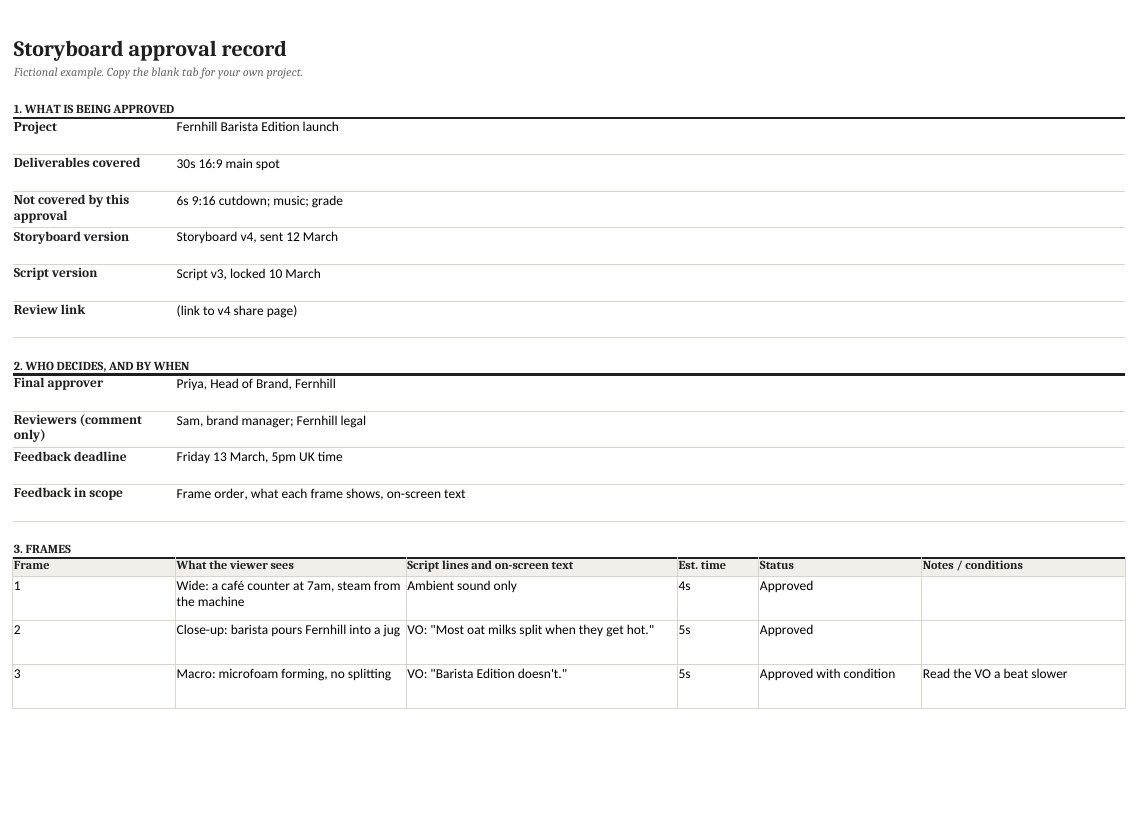
Prefer paper? There's also a printable PDF of the record.
What 1,248 approved storyboards tell us
Since storyboard statuses launched in November 2025, 347 teams have moved 1,248 storyboards to Approved in Boords. 57% of them jumped straight to Approved with no review step, so we focused on the 377 that went through Review Needed first. All figures are aggregate; no individual project was read.
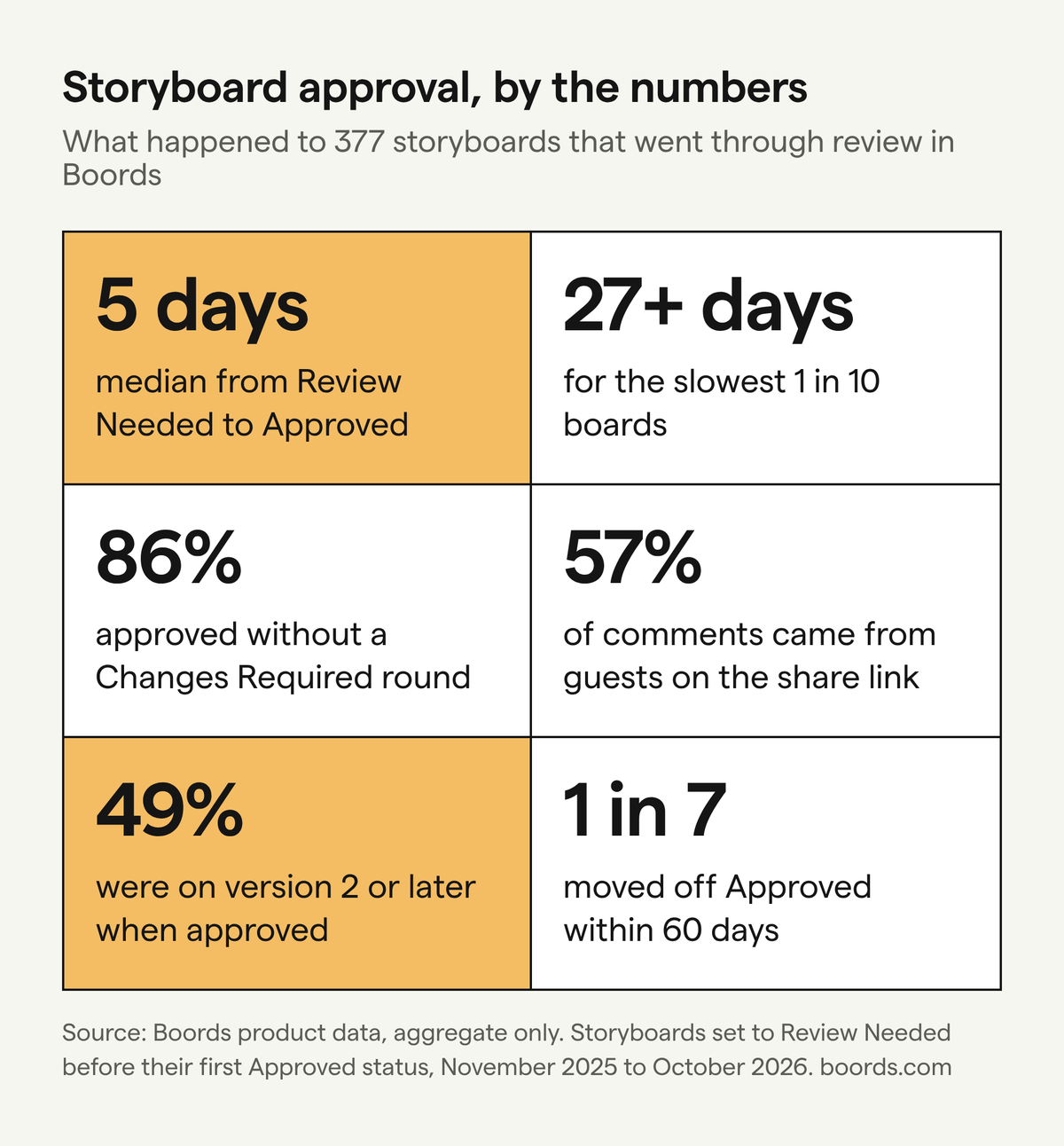
What that means in practice:
- Schedule for the slow tail. The median review takes 5.1 days, but one in ten boards takes more than 27. Put a deadline in the review request.

- Two rounds is a warning sign. Only 1.9% of boards needed two or more Changes Required rounds. If that's you, look at the brief or the review request, not the board.
- Your client does most of the talking. 57% of comments came from guests reviewing on a share link, and the busiest 10% of boards collected 28 or more.
- Approval isn't the end. About one approved board in seven moves off Approved within 60 days (13.9%), and 15.9% get a new version. You can't stop that, but you can make sure the approved version survives it.
Before you send the link
Three lines of admin head off the most common extra round:
- Name the version. "Storyboard v4, 12 March", not "the latest storyboard". Every comment and the decision refer to it.
- Name one approver. Others can comment, but only one person says yes. If the client can't name them, that's your biggest risk.
- Name the deliverables. If the board covers the 30-second spot but not the 6-second cutdown, say so.
The storyboard approval checklist
The client approves each item or flags it:
- Script: the board follows a locked script version, word for word.
- Frames: numbered, and each says what the viewer sees ("close-up of the carton being poured", not "product moment").
- Brand and claims: packaging and logos are current or marked as placeholders; claims are checked by the client's legal or brand team.
- On-screen text: supers, legal lines and URLs written out in full.
- Timing: each frame has a duration, and the total matches the deliverable.
- Placeholders: listed in one place, each with an owner and a date.
- Blockers: anything open that changes what will be filmed or animated blocks approval, or the affected frames are excluded by number.
- Decision: one approver, one decision (approved, approved with listed conditions, or not approved), one date.
A worked example: a six-frame approval record
This is the Example tab from the template: a fictional 30-second launch spot for Fernhill, a made-up oat milk brand. The agency sent Storyboard v4, following Script v3, to Priya, Head of Brand, with feedback due by 5pm UK time on Friday 13 March. The 6-second cutdown isn't covered.
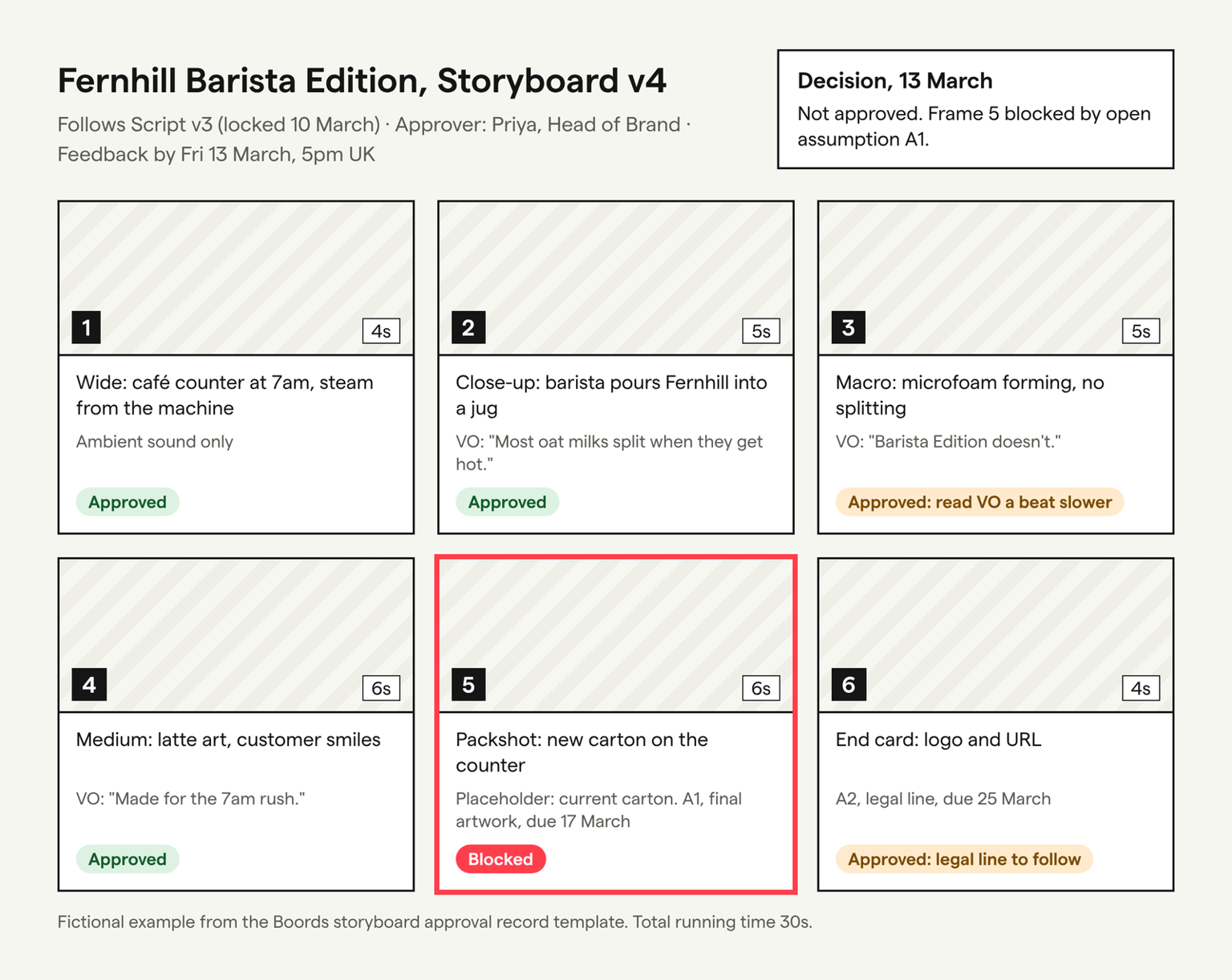
| Frame | What the viewer sees | Script v3 and on-screen text | Status |
|---|---|---|---|
| 1 (4s) | Wide: a café counter at 7am, steam from the machine | Ambient sound only | Approved |
| 2 (5s) | Close-up: barista pours Fernhill into a jug | VO: "Most oat milks split when they get hot." | Approved |
| 3 (5s) | Macro: microfoam forming, no splitting | VO: "Barista Edition doesn't." | Approved, VO read a beat slower |
| 4 (6s) | Medium: latte art, customer smiles | VO: "Made for the 7am rush." | Approved |
| 5 (6s) | Packshot: new carton on the counter | VO: "Fernhill Barista Edition. Out now."; Text: "In stores from 1 April" | Blocked by A1 |
| 6 (4s) | End card: logo and URL | Text: fernhill.example, legal line | Approved, legal line to follow (A2) |
Open assumptions: A1, final carton artwork for frame 5, owned by Fernhill's packaging team, due 17 March. A2, the legal line for frame 6, owned by Fernhill legal, due 25 March.
Decision (13 March): not approved. Frame 5 can't be signed off until the carton is final, because the packshot is filmed on the day and a placeholder there means a reshoot.
What happened next:
- 17 March: final carton arrives. Only frame 5 changes, and it goes out as Storyboard v5.
- 18 March: Priya approves v5 with two conditions: the frame 3 VO is read a beat slower, and the legal line arrives in time for the edit.
- 23 March: the brand manager wants frame 4's VO to say "Made for the morning rush." That's a script change, so it becomes Script v4 and Storyboard v6, and only frame 4 goes back for review. v5 stays as approved.
That last step is the one-in-seven case from the data. Because the change made a new version, everyone can still see exactly what was signed off on 18 March.
How to write the review request
"Let us know your thoughts" invites notes on everything, including things agreed two stages ago. Say what's in scope, what isn't, who decides and by when:
Hi Sam, Storyboard v4 for the Barista Edition spot is ready: [link]. This round we need sign-off on frame order, what each frame shows and the on-screen text. Music and grade come later, at the animatic. Frame 5 uses the current carton as a placeholder until the new artwork lands. Please leave comments on the frames by 5pm UK time on Friday 13 March. Priya, as Head of Brand, will give the final yes or no.
Don't treat silence as approval unless your contract says so. Chase the named approver instead.
Record the decision and freeze the version
Record who approved, which version, the date and any conditions, in the same place as the board. An emailed "approved" with no version attached is the hardest kind to rely on later.
Then don't edit that version. Any change, to the script, a frame or a timing, becomes a new version with only the changed frames sent for review. On a fixed number of revision rounds, that also makes it obvious when a change is a new round.
What an approved storyboard does and doesn't protect
As Charles Haine puts it in Frame.io's guide to client approval, "the real power of approved boards is that your client can't ask for things in post that weren't in the boards." That only holds if the record shows which boards.
An approval doesn't stop a client changing their mind. It turns "can we just..." into a visible change against a known version, which your contract decides how to handle. The Animation UK contract template, for example, gives the client "up to two rounds of feedback within the project scope", and frames their role as a right to give feedback rather than a right of approval, so a withheld approval can't block payment. If your terms say nothing about storyboards, this is the kind of wording to discuss with whoever drafts them (an example, not legal advice):
The Client may give consolidated feedback on each storyboard version within [5] business days. The fee includes [two] rounds of storyboard feedback. Once the named approver approves a version, changes to it are a new round and may be charged at the agreed day rate.
And a storyboard can't show pacing, performance or the final look, so say what this stage isn't approving (usually music, grade and final animation).
Hand the approved board to production
Give production the approved board version, the locked script version and the conditions, then build the shot list from the approved frames. If you use a shot list template, copy the frame numbers across so each shot points back to what the client approved. For the wider process, see the pre-production guide and the client pre-production checklist.
Where this lives in Boords
The template works in a spreadsheet. The hard part is keeping comments, versions and the decision together, which is what Boords' review and approval tools do:
- Review link: clients open a share link without an account. Paid plans can add a passphrase.
- Frame comments: reviewers comment on individual frames under a name they type; your team replies and marks comments complete. Team-only comments are on Team and Agency.
- The decision: a status change from Review Needed to Changes Required or Approved, which you can show to guests. Frames carry a status too, so frame 5 can wait while the rest are Approved.
- The record: the activity log records status changes, comments, shares and when an emailed reviewer first opened the board.
- Freezing the version: a new storyboard version leaves the old one intact, and frame revisions let you lock the image the client agreed.
Two limits: converting a script to a storyboard takes a snapshot, so check the board against the locked script before sending; and a guest's name is whatever they type, so get a written sign-off if you need a signature.
Frequently asked questions
What should a client approve on a storyboard?
The client approves the version of the board in front of them: frame order, what each frame shows, the script lines and on-screen text in each frame, rough timings, and the list of placeholders. They aren't approving final artwork, color grade or music unless the board says so.
How long does storyboard approval take?
Across 377 storyboards that went through a review step in Boords, the median time from Review Needed to Approved was 5.1 days. One in ten took more than 27 days, so set a feedback deadline in the review request and chase the named approver when it passes.
Who should sign off a storyboard?
One named person on the client side with the authority to commit budget to the shoot or animation. Other stakeholders comment before the deadline; the approver makes the final call. Name them in the review request.
What happens if the client changes the script after the storyboard is approved?
Treat it as a new version. Update the script version, make a new storyboard version with the affected frames changed, and send those frames for review. The earlier approval stays on record for the earlier version.
Is a storyboard approval a contract?
Not by itself. An approval record shows what was agreed and when, which is useful when scope is discussed later, but whether it's binding depends on your contract with the client. Put revision rounds and change terms in the contract, and use the approval record as evidence of what was signed off.
Sharper preproduction, less back-and-forth
Workflow tips and Boords product updates for video and brand teams, twice a week.
More from the blog


Get every video signed off before production starts
Create scripts, storyboards, and animatics with your team.
Collect client feedback, keep every version on record, and go into production knowing exactly what was approved.